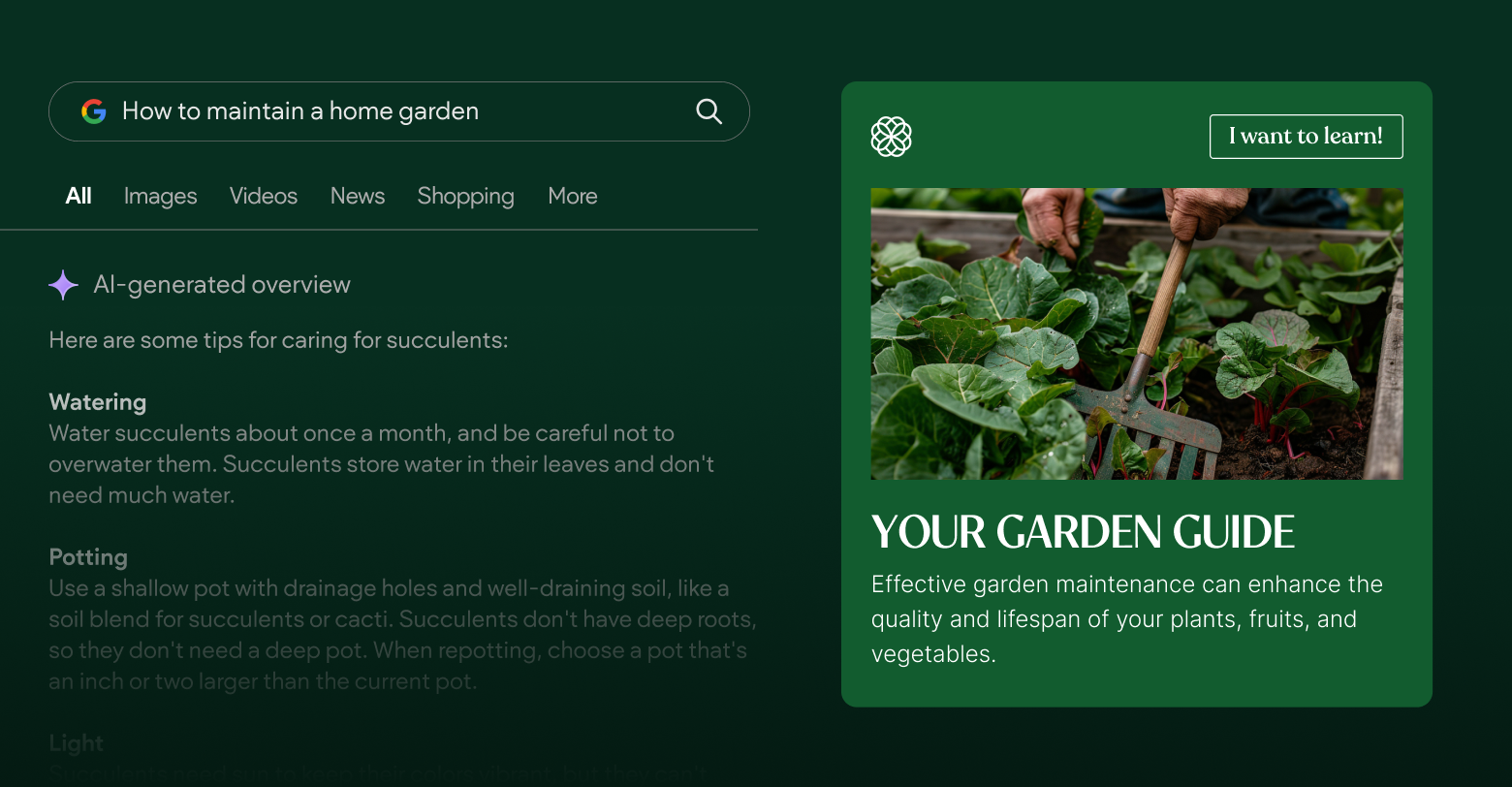
The new feature of Google search, AI Overview (AIO), creates new challenges and opportunities for SEOs.
Although AIO draws some informational traffic away from your site due to its rapid answers, it also allows you to get the link to your page featured on top of every other organic result.
AI Overview sources are featured for every generative AI result and lead to sites where Google’s AI retrieves information. Since they’re displayed above organic results and might be understood by users as authoritative sources, getting featured there may increase your traffic and leads.
First, learn how Google determines what sites to put in AIO sources. This article will explain how AI Overviews work and which sites Google prioritizes to appear in the sources.
What are AI Overviews?
You might have heard the term Search Generative Experience (SGE) before referring to generative AI answers on Google. Google AI Overviews yields the same technology but has improved and was officially released earlier in 2024.
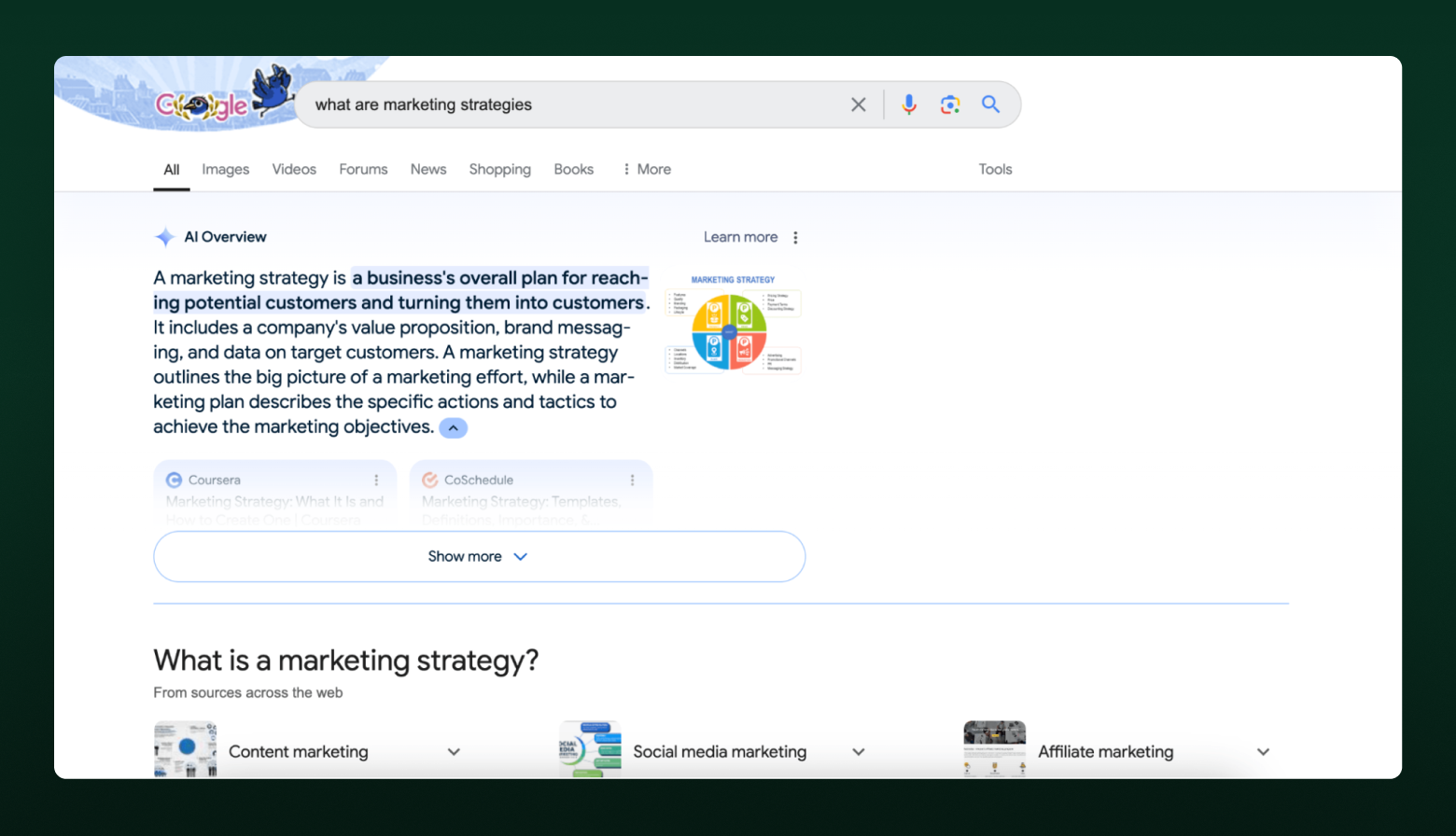
When a user googles something that the search engine believes would benefit from an AI-generated explanation, an AI Overview will appear. It will explain the topic, show sources, and give the option to see a more detailed explanation.
Upon clicking on the Show more button, the AIO will expand, show the user a longer answer, and show more AI Overview sources.
Right now, this feature is available in the US and is rolling out in the UK, India, Japan, Indonesia, Mexico, and Brazil.
What are the sources of AI Overview?
Google doesn’t explain the exact way AI Overview sources work and
only tells us that AIO links to the “resources that support information in the snapshot” and “determines which links appear automatically.”
However, if you dig deeper and check the
Generative summaries for search results patent, you’ll learn that Google collects information that answers the query and then collects sources to prove it. When selecting the information and sources, Google analyzed factors, including how diverse the information they provide is. And if it’s limited, it can check sources from related SERPs.
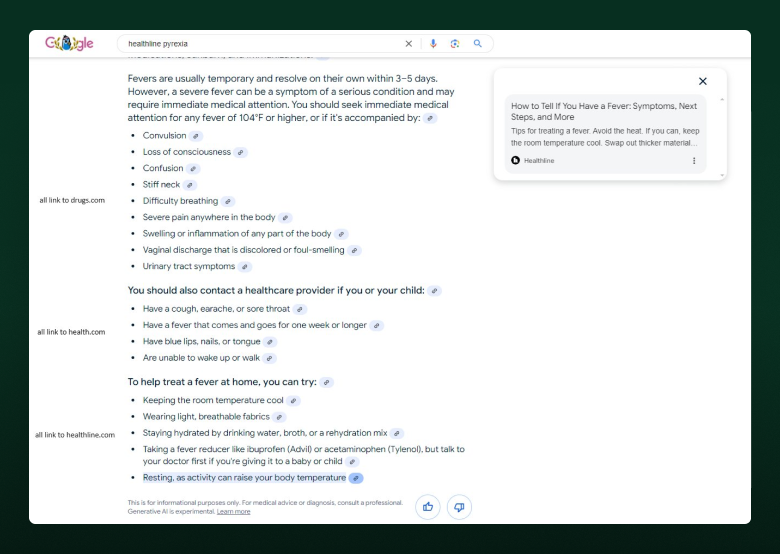
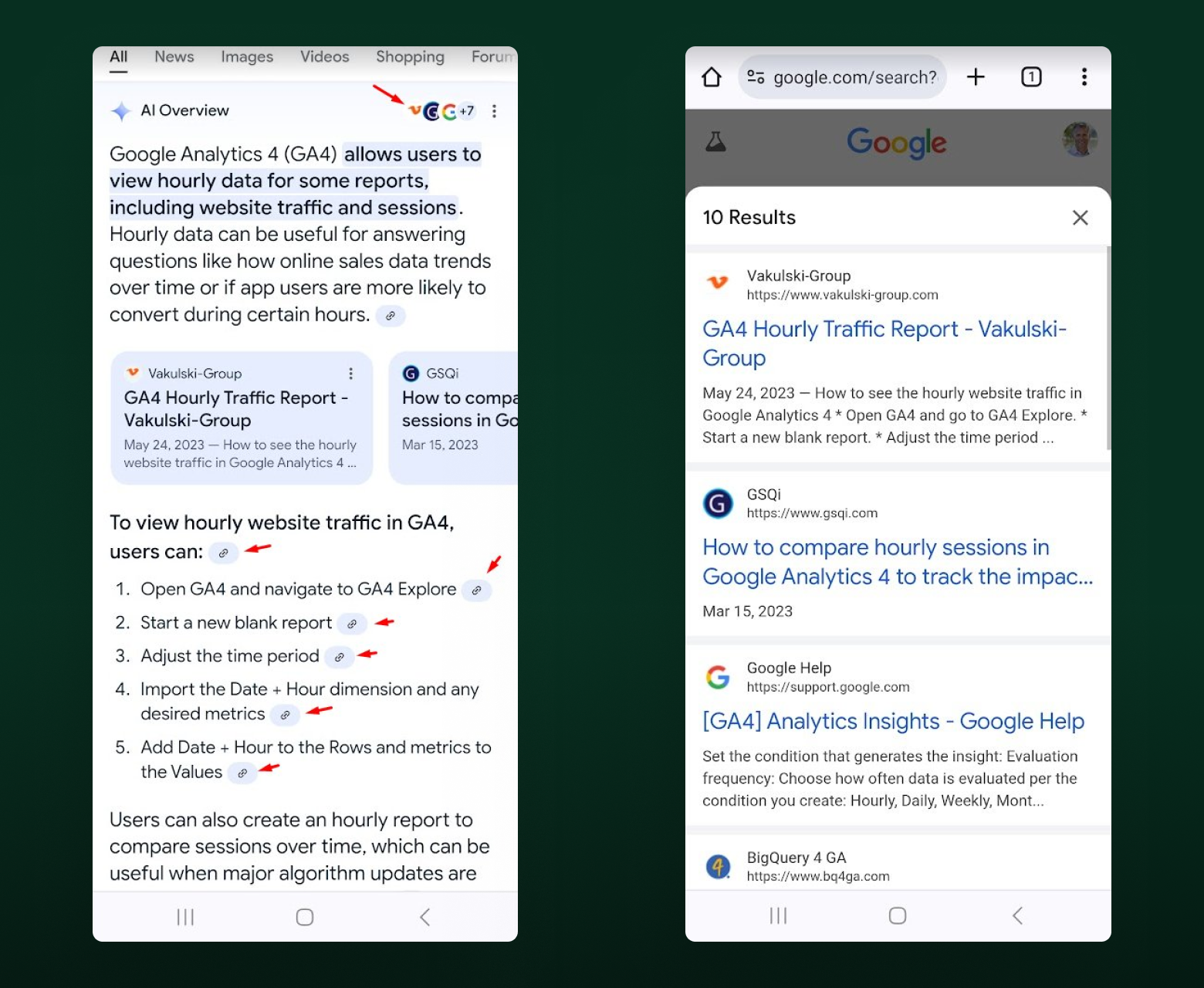
One thing that’s apparent after almost a year of AI Overviews in SERP is that Google experiments with new ways to show links. Until recently, links appeared next to the text. In August 2024, SEO experts noticed a new experiment—links within text. In many cases, multiple links led to one source.
In mobile search, links are shown in text and as a list below it. A full list is accessible through the menu button at the top right corner.
Based on SE Ranking
research on AI Overview sources, in January 2024, a portion of links were from UGC sources like Reddit and Quora.
In July 2024, these sources were nonexistent on linked websites. A plausible reason is Google's AI can’t understand human-written content. Taking information from those sites led to fake data in the answer.
Google’s AI Overviews mostly link to relevant, highly trusted sites like Forbes, Wikipedia, and established industry blogs. To learn whether your website is featured in AI Overviews triggered by your target keywords, use dedicated tools such as SE Ranking’s
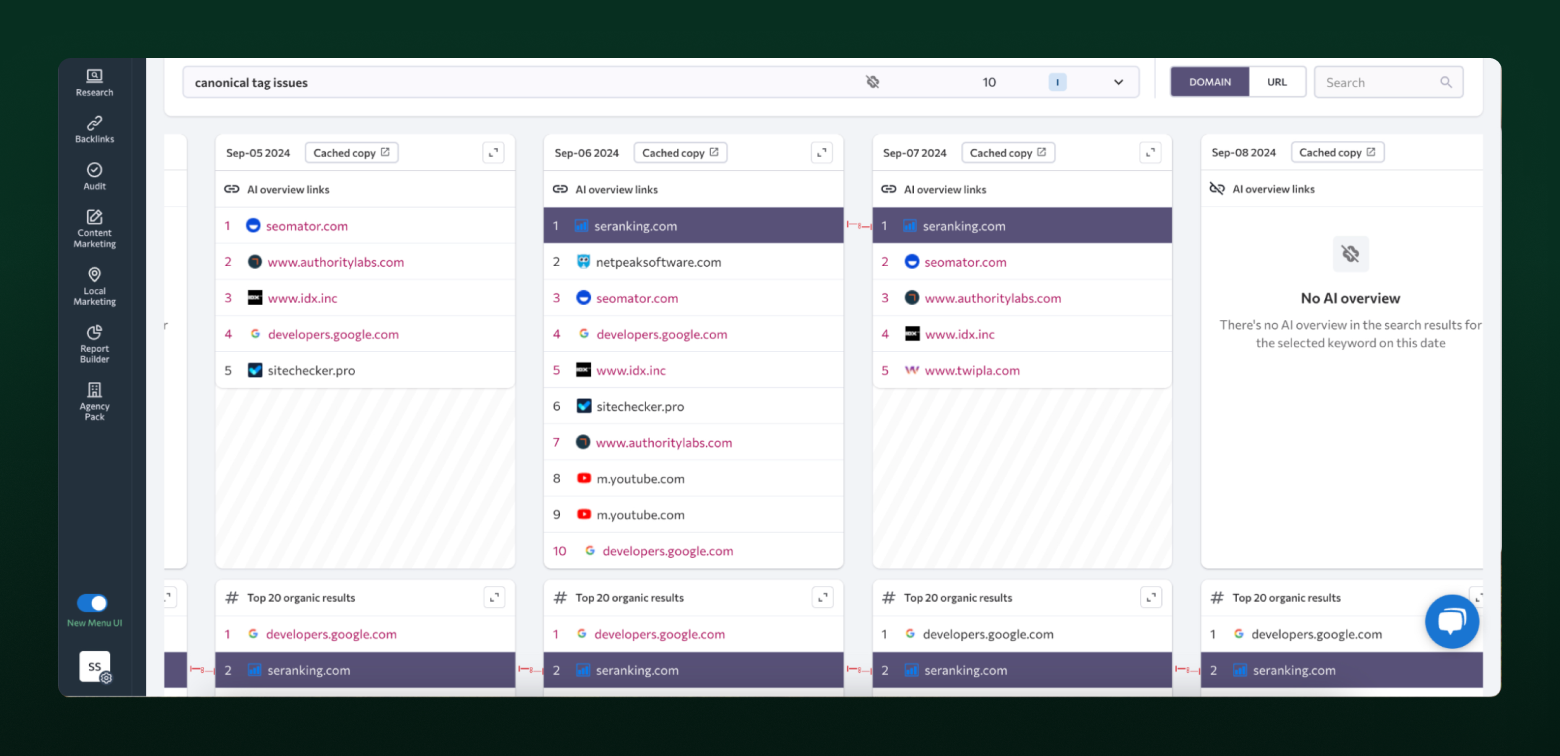
AI Overviews tracker. As one of the first solutions on the market, it allows you to analyze which sites Google favors as AI Overviews sources for your specific keywords. You can track how the sources change and immediately see how the source websites rank in the regular SERPs.
SE Ranking also stores cached AI answers so you can check the exact layout of AI Overviews. They also incorporated AI Overviews in the Competitive Research tool, and now you can check AI Overviews presence for over 100 million keywords from different industries before adding new keywords to your target list.
Official Google guidelines tell webmasters they don’t need to do anything special for their links to appear in AI Overview sources apart from following Search Essentials. SE Ranking’s AI Overview research shows that pages linked in Google AI Overviews intersect with pages in the top 10 of SERP—and sometimes even the top 100—and pages linked to in the featured snippet.
How many sources are included in AI Overviews?
Google doesn’t use just a single source for the AI Overview. Multiple websites are always linked in the sources. This correlates with data from the patent, as Google wants to highlight different perspectives in its AI-generated answers to make them comprehensive and beneficial to searchers.
Because an AI Overview appears in a collapsed panel, a small amount of links are shown before clicking on the Show more button. More links appear as the user expands the AIO answer.
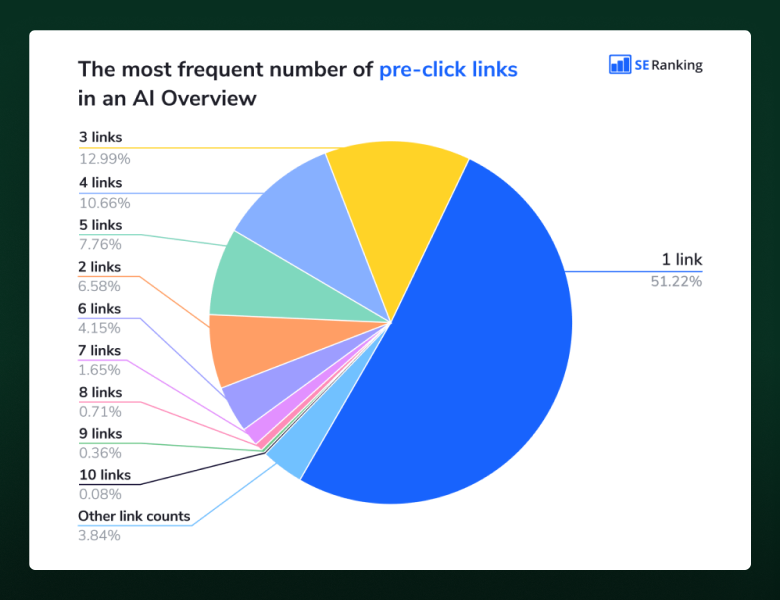
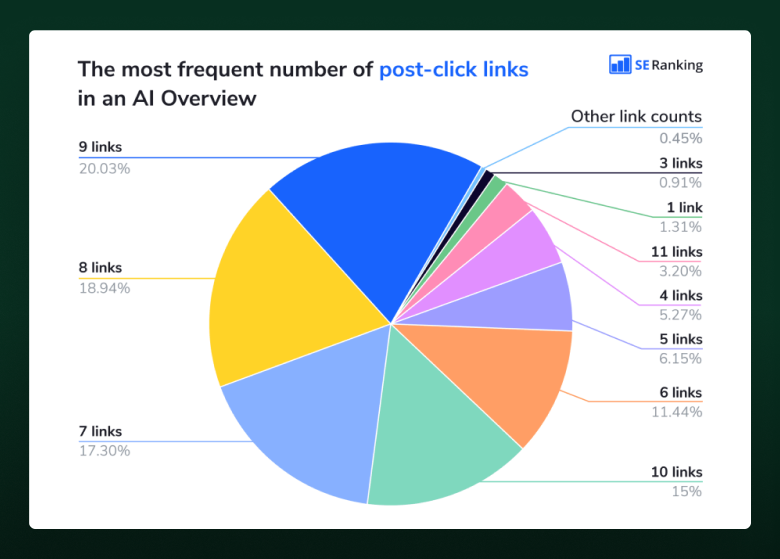
SE Ranking’s research of 100,013 keywords during the period between June and July 2024 shows that the average number of links before expanding AIOs (pre-click links) and after expanding (post-click links) increased slightly while the maximum number decreased.
In June, there could be as many as 19 pre-click links and 26 post-click links. In July, those numbers were down to 10 and 13.
The most common number of pre-click links in AI Overviews is just one, with three and four links also appearing frequently.
After clicking on the AIO, you're likely to encounter anywhere from seven to ten links in the sources.
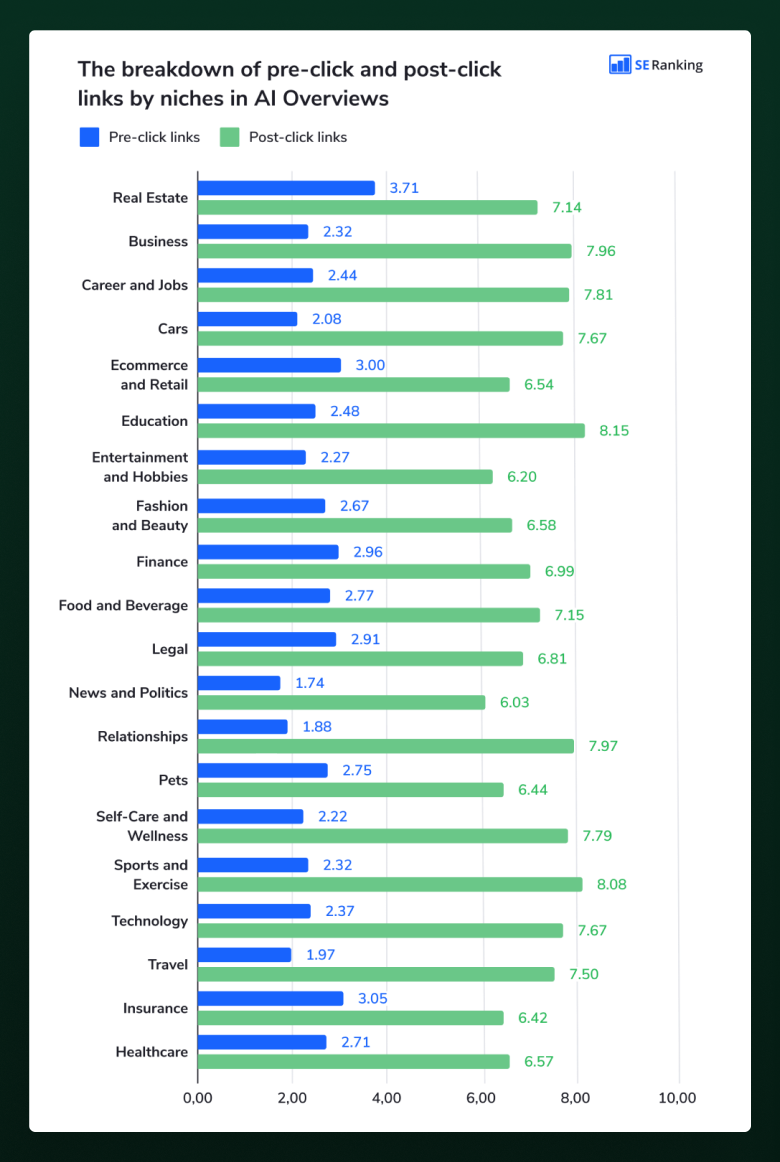
On average, you’ll see 2.5 pre-click links and 7.2 post-click links, but these numbers can differ depending on the niche. On average, education, sports and exercise, and relationships will have more post-click links, while real estate, insurance, and eCommerce and retail topics will have more pre-click links.
Since now links can be shown as a list, this allows for CTR optimization. Create a better title to drive more clicks from the AI Overview once your link makes it to the list.
Top-linked websites in AI Overviews
Since Google links to domains it perceives to be highly authoritative, it’s only natural that some domains appear in AI Overview sources over others. These ten have been consistently linked to in an AIO.
- Youtube.com (1,346 mentions)
- Linkedin.com (1,091 mentions)
- Healthline.com (1,091 mentions)
- Verywellmind.com (855 mentions)
- Forbes.com (804 mentions)
- Webmd.com (770 mentions)
- Wikipedia.com (726 mentions)
- Ny.gov (711 mentions)
- Indeed.com (597 mentions)
- Psychologytoday.com (563 mentions)
Google links to websites that have markers of authority Google refers to: a high number of links, registered a long time ago, show a decent E-E-A-T.
It is also eager to link to YouTube sources for practical questions, which is biased, as YouTube isn’t guaranteed to have the best information, but is owned by Google.
What major media appear in AI Overviews
The only consistent news media website across all industries is Forbes.com (15 niches out of 20). It also has the highest number of links from AIOs: 804 links from 723 AI Overviews. This might seem surprising, but it’s likely due to the larger Google effort to avoid bias in AI Overview results.
In the news and politics niche, only 0.68% of keywords trigger an AIO, so there aren't a lot of places these sites can appear in.
Other news media websites frequently linked across multiple industries are:
- Businessinsider.com (9 niches out of 20)
- Mashable.com (8 niches out of 20)
- Theguardian.com (8 niches out of 20)
- Entrepreneur.com (7 niches out of 20)
These websites appear in source lists in multiple industries like business, self-care, finance, and relationships.
Forums & social media platforms struggle for visibility in AI Overviews
Before the official rollout in May, AI Overviews included links to forums and social media sites. According to the first research by SE Ranking, Reddit and Quora appeared in the linked sources a lot, with the latter having over 3,000 mentions.
Current results show Reddit and Quora aren’t present in the linked sources at all.
LinkedIn is the only social media platform frequently present in the AI Overview sources (1,091 links from 905 AIOs). But there’s a catch.
LinkedIn is not just a social media platform, as it works as a blogging platform like Medium. Users can publish blog posts on LinkedIn that rank well in Google.
Since LinkedIn is an old, authoritative website that hosts hundreds of thousands of articles, it’s used as a source on AI Overviews.
LinkedIn blogs do not have editorial control, though, so this website might not appear in sources as much in the future if Google decides to work on improving the source list.
What about .gov, .edu, and .mil domain websites?
Domains present in the top 20 linked domains are mostly older, highly authoritative blogs. Governmental, educational, and military domains are considered more authoritative from Google’s perspective, so these domains have fewer backlinks and referring domains while appearing in AI Overview links.
Out of the 7,475 keywords that triggered an AI Overview in the July 2024 research, 19% of AIOs had links going to .gov websites. However, out of 51,745 links discovered during this research, only 3.49% went to such domains.
In niches heavily regulated like finance or insurance, the number of links to .gov websites is higher. In healthcare, 29.81% of links in AIOs go to .gov websites.
Similar numbers show up for .edu domains. Those recordings comprise 26% of keywords included in .edu links in AIOs, while the percentage of these links in the sources is 4.85%. Surprisingly, keywords related to education trigger fewer .edu sources than real estate, legal, and relationships topics.
Military domains make up only 0.85% of all links discovered, mostly to content about military families and healthcare.
Matches between AI Overview sources and organic search results
The main idea behind AI Overview sources is that they should be authoritative and correct. So, Google will link to high-ranking websites for the keyword an AI Overview is triggered by. They were already determined to answer the search query quite well.
However, the patent we referred to earlier also suggests Google might also look for related sources if the top pages aren’t diverse enough. That’s why the sources section in AIOs can feature pages that don't rank in the top 10 for those search queries in AIOs.
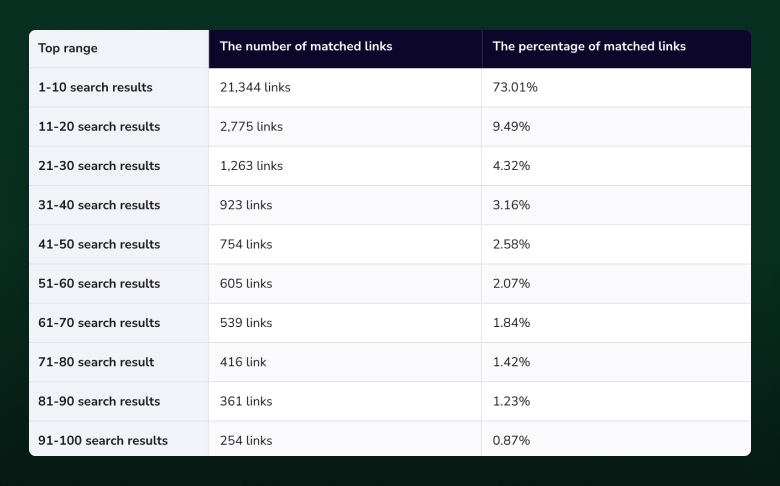
In SE Ranking research, this idea is confirmed, as 56% of pages linked to in AI Overviews are pages from the top 100 of SERP, while 73% are from the top 10.
Pages that appear on positions 11-100 are still likely to be in the sources, with a 27% occurrence rate. The lower the SERP, the less likely the page is to be featured, with positions 91-100 only being linked to in 0.87% of cases.
These numbers differ depending on the niche. For instance, 42% of the top 30 links in AI Overviews are for business-related queries, and 65% for the food and beverage niche.
Typically, you’ll see multiple links from the top 10 in an AI Overview. In 72% of cases, you’ll see anywhere between one and four links.
So, you still might have a chance of making it to AI Overview sources even if your page is not in the top 10 organic search results. But being there increases those chances quite a lot.
Metrics and features of top-linked sources in AI Overviews
As Google frequently links to established websites that rank in the top ten, these sites tend to excel in terms of SEO metrics. Here are similarities between the 20 top-linked domains in AI Overviews:
- 24K to 24.10M referring domains
- 247K to 38.50B backlinks
- 531K to 1.07B organic keywords
- 213K to 8.14B organic traffic
- Average domain age 25 years
This doesn’t mean your page can’t get on the list of sources unless you have a quarter of a century-old website with 38 billion links. Those stats may be skewed due to .gov domains and YouTube being on the list.
It’s more useful to look at a couple of pages from informational websites that ended up on AIO. Judging from SE Ranking research into a few of those, here are the similarities.
- 5K to 20K estimated monthly traffic
- 2K to 7K referring domains
- Marked as updated in 2024 or late 2023
- Most have structured data markup
- Most are well-structured and longer than 1,200 words
- Most feature authors on the page
Articles from authoritative domains like Linkedin.com have almost no backlinks and are marked as
AI-generated content by multiple tools, so it seems Google values the domain authority a bit too much.
It would be hard to beat 7K referring domains on a single article. If you’re trying to get your page in AI Overview links, focus on having it answer the search intent, create content that covers related topics, have a few high-authority links, and work on E-E-A-T.
Summary
Thankfully for SEO, Google’s AI Overviews don’t just provide a ready-made answer but also create a list of sources users can visit to learn more about the topic. This list is displayed above the organic results, so getting your page on it might be the new race toward the featured snippet.
Right now, AIO sources are dominated by old, established domains with tens of thousands of backlinks. But in most cases, four links out of ten are from the top 10 of Google. This means you still stand a chance.
Based on the research, here’s what to consider:
- Create content that answers search intent
- Cover related questions
- Add author profiles
- Add structured data
- Work on E-E-A-T
- Update content regularly
- Gain mentions from high-authority websites
Follow these tips, and you’ll be more likely to get your page on a list of sources.
<>