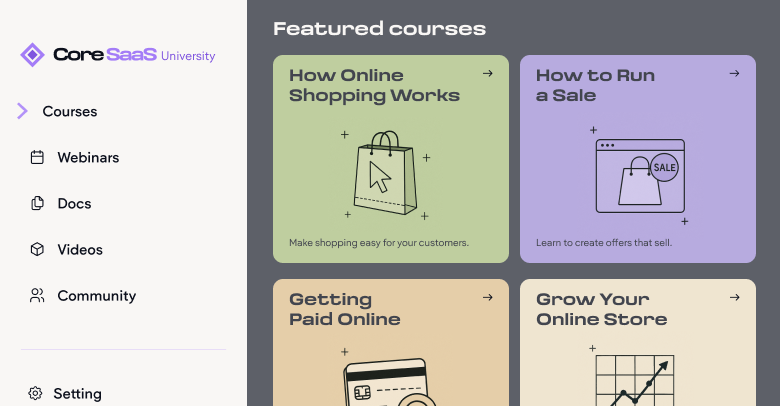
In today's competitive Software as a Service (SaaS) landscape, simply offering innovative features isn't enough. Customer education has evolved from a supplementary element to a critical driver of sustained growth and strong customer relationships. Proactively investing in comprehensive educational programs unlocks numerous benefits throughout the customer lifecycle, fostering loyalty and optimizing operational efficiency.
How educational curriculum drives success
Investing in customer education yields significant advantages, directly impacting key business metrics. A well-designed curriculum empowers users to fully leverage the platform, leading to greater product adoption and deeper engagement. When customers understand the nuances and capabilities of the software, they integrate it more thoroughly into their workflows and explore its diverse functionalities. This deeper interaction cultivates mastery and encourages the discovery of new ways the product can enhance their operations.
Furthermore, a robust educational curriculum streamlines customer onboarding. Easily accessible resources guiding new users through initial setup and core functionalities significantly reduce the time to value realization. This positive initial experience builds confidence and minimizes early frustration or churn. Self-paced learning materials, such as knowledge bases and interactive tutorials, allow users to become comfortable with the product at their own pace, resulting in a more effective and less overwhelming introduction.
The link between customer education and reduced churn, coupled with increased retention, is another compelling advantage. Knowledgeable and supported users are significantly less likely to seek alternative solutions. Educational resources instill confidence, making users feel capable of achieving their desired outcomes. This confidence, combined with ongoing learning opportunities, strengthens their connection to the product and increases subscription renewal rates.
Moreover, investing in customer education optimizes customer support operations and lowers associated costs. Educated customers are more self-sufficient, resolving common issues independently using provided learning materials. This reduced reliance on direct support channels lowers support ticket volume, allowing support teams to focus on complex issues. This efficiency not only cuts operational expenses but also enhances the overall responsiveness of the customer success organization.
Finally, satisfied and knowledgeable customers are more likely to become brand advocates, recommending the product and exploring advanced features and upgrades. A comprehensive program transforms users into champions who organically drive growth and enhance brand credibility through positive word-of-mouth and referrals. This organic promotion, stemming from a deep understanding of the product's value, is often more impactful than traditional marketing.
The advantages of customer education are interconnected, creating a positive cycle for both the SaaS provider and the customer. Well-informed users who can effectively utilize the product experience increased satisfaction, leading to greater engagement and platform commitment. This reduces the need for extensive support and makes them more receptive to exploring additional features and upgrades. The tangible return on investment can be significant, with potential increases in Annual Recurring Revenue (ARR) and substantial reductions in customer churn. Prioritizing customer education is a strategic investment in customer success, directly fueling business growth and sustainability.
Best practices for designing a customer education program
Building an impactful customer education program requires a strategic, customer-centric approach. Several key steps and considerations are essential for creating a program that effectively drives product adoption and reduces support inquiries.
Defining clear learning objectives aligned with different stages of the customer journey is paramount. Objectives should emphasize problem-solving and enabling users to achieve specific outcomes, rather than just listing product features. Understanding the target audience and their unique needs through segmentation based on roles, responsibilities, and technical proficiency allows for personalized educational content.
Mapping the customer journey visually identifies key touchpoints where educational interventions can be most effective. Tailoring resources to address specific needs and potential pain points at each stage is crucial. The user experience (UX) of the learning platform and the content itself should be intuitive, engaging, and aesthetically pleasing to encourage participation and knowledge retention.
Promoting cross-team collaboration involving customer success, sales, support, and product development ensures diverse perspectives are considered, leading to a more comprehensive and aligned curriculum. Setting clear goals and allocating necessary resources, including learning management systems (LMS), content creation tools, and skilled personnel, are also fundamental. Finally, a commitment to continuous improvement through user feedback and program analysis ensures the curriculum remains relevant and effective.
A successful program is deeply rooted in understanding the customer's journey and their specific needs at each interaction. Thoughtfully tailored content addressing precise questions and challenges at different engagement stages yields better results than generic materials. The collaborative involvement of internal teams is indispensable for creating a well-rounded, accurate, and impactful program aligned with both customer needs and business objectives.
Methods for effectively educating new customers
Effectively introducing a SaaS product to new customers through educational content is crucial for setting the stage for long-term engagement and success. The initial learning experience significantly influences a customer's perception and adoption likelihood. Strategically employing varied methods and channels creates a positive first impression and accelerates time to value.
Welcome emails and onboarding checklists provide foundational guidance through initial steps. Automated emails offer a warm welcome and outline essential actions. Onboarding checklists break down complex setups into manageable tasks, providing a clear path and a sense of accomplishment. Interactive walkthroughs and product tours offer hands-on learning within the application, familiarizing users with key features and workflows intuitively.
Tutorial videos and explainer content offer visually engaging demonstrations of product usage and core benefits, catering to visual learners and simplifying complex concepts. A comprehensive knowledge base and help center provide self-paced, detailed information, empowering users to find independent solutions. Webinars and live training sessions offer interactive learning with real-time instruction and Q&A. Integrating these resources within an in-app resource center provides centralized, easily accessible support without leaving the product environment.
Successful strategies often combine these methods, recognizing diverse learning preferences and information needs. A multi-modal approach ensures users can engage with content in their preferred style and according to their specific needs. Personalizing onboarding and educational content based on user roles, goals, or industry significantly enhances engagement and accelerates time to value, laying a strong foundation for lasting customer relationships.
Customer education as a tool for reducing support tickets
A well-structured customer education program serves as a powerful mechanism for significantly reducing customer support ticket volume. By empowering users with the knowledge to navigate the product effectively, companies foster self-sufficiency and minimize the need for direct assistance. This connection between education and support optimization yields substantial benefits for both the customer and the SaaS provider.
Establishing a robust, self-service knowledge base with articles, FAQs, and troubleshooting guides enables users to independently find answers and resolve common issues, deflecting routine inquiries and allowing support teams to focus on complex challenges.
Beyond reactive support, proactive education anticipates potential user questions and addresses common challenges before they escalate into support tickets. Clear instructions, best practices, and usage guidance empower users to avoid common pitfalls and effectively utilize the software, reducing the likelihood of support inquiries and contributing to a more positive user experience.
Thorough customer training leads to improved user proficiency and a reduction in errors, further decreasing the demand for support as users become more adept at navigating the platform and resolving minor issues independently.
Numerous case studies and statistical evidence highlight the tangible impact of customer education on support ticket reduction. Companies like Absorb LMS, Appen, Adobe, and Intellum have reported significant reductions in support tickets and costs as a direct result of strategic customer education initiatives.
The decrease in support tickets is a direct consequence of equipping customers with the knowledge they need to help themselves. This self-sufficiency not only benefits the customer with quick solutions but also allows SaaS companies to optimize support resources and reduce operational overhead. Tracking key metrics like overall ticket volume, deflection rate, and time to resolution provides valuable insights into the effectiveness of customer education initiatives and identifies areas for continuous improvement.
Applying the success approximation model to curriculum development
In the dynamic SaaS environment, an agile and iterative approach to curriculum development is paramount. The Successive Approximation Model (SAM) offers a flexible, collaborative, and continuously improving framework.
The SAM model involves three key phases: Preparation, Iterative Design, and Iterative Development. The Preparation phase gathers background information and includes a "Savvy Start," a collaborative brainstorming session to establish a shared vision and initial prototypes. The Iterative Design phase involves cyclical designing, prototyping, and reviewing, with multiple rough prototypes created early for rapid feedback and refinement. The Iterative Development phase focuses on building and implementing the final product through alpha, beta, and gold versions, incorporating feedback at each stage.
Applying SAM to SaaS curriculum development allows for rapid prototyping and early user feedback, ensuring the curriculum meets actual learner needs. The flexibility of SAM is particularly beneficial in the evolving SaaS landscape, allowing for adjustments at any stage. Best practices include fostering strong collaboration, emphasizing rapid prototyping, and prioritizing continuous feedback. Potential challenges like managing stakeholder expectations and ensuring consistent communication should be addressed proactively.
The iterative nature of SAM aligns with agile SaaS development cycles, ensuring the curriculum evolves with the product. The "Savvy Start" phase fosters a user-centered approach, creating educational content that directly addresses customer learning needs, leading to more effective product adoption and reduced support inquiries.
Identifying critical moments in the customer journey
Developing a truly resonant and effective educational curriculum requires identifying the critical "moments of need" throughout the customer journey. These are specific stages where customers are most likely to encounter pain points, have questions, or require guidance. Understanding these moments allows for the delivery of targeted and timely educational resources that enhance the customer experience.
Customer journey mapping visualizes every customer step, highlighting potential pain points, areas of confusion, and opportunities for educational intervention. Analyzing customer behavior data, including feature usage, navigation patterns, and drop-off points, identifies areas where users might be struggling.
Gathering direct customer feedback through surveys, interviews, and feedback forms provides crucial insights into pain points and knowledge gaps. Analyzing support tickets and customer service interactions reveals recurring questions and areas needing assistance. Identifying the "aha moments," where users first realize the product's value, is crucial for ensuring the onboarding process effectively guides new customers to this realization quickly.
Understanding the customer journey from their perspective is paramount. Empathy mapping helps anticipate needs, frustrations, and knowledge gaps at each interaction stage. Proactively identifying these "moments of need" allows for the provision of timely and relevant educational resources, addressing potential issues before they escalate and ensuring a more positive and successful customer experience.
Exploring diverse educational formats for your users
Effectively educating SaaS customers with varied learning preferences and needs across different journey stages requires a diverse range of educational content formats, each offering unique advantages.
Articles and blog posts provide in-depth guides and thought leadership. Videos and video tutorials offer visual and engaging learning experiences. Interactive tutorials and walkthroughs allow for hands-on learning within the product. Webinars and live training sessions provide real-time interaction. Case studies and customer success stories offer social proof. Knowledge bases and FAQs serve as essential self-service resources. In-app resource centers integrate materials directly within the product. Email drip campaigns deliver targeted content at specific journey points. Badges and certifications add gamification and recognize achievements.
The selection of the most appropriate format should be guided by specific learning objectives and the customer journey stage. Repurposing content across formats and channels maximizes reach and impact while optimizing resource utilization.
Structuring and organizing your educational curriculum
A well-structured and organized educational curriculum is essential for enabling users to progress from introductory understanding to advanced mastery. A logical flow and clear progression ensure effective knowledge and skill acquisition.
Defining clear learning paths that guide users through sequenced modules is fundamental. Breaking down the curriculum into smaller, modular content units allows for digestible information consumption. Logical categorization and tagging facilitate easy search and discovery. Implementing progress tracking and celebrating milestones keep users engaged. Incorporating assessments reinforces learning.
Offering certifications for advanced learning provides additional incentive. Finally, establishing a robust process for regular curriculum review and updates ensures content accuracy and relevance.
A well-structured curriculum should mirror the customer journey, providing the right information at the right time. Regular content audits are essential to maintain accuracy and relevance, preventing user frustration and reducing support inquiries.
Invest in customer knowledge for long term success
Developing a comprehensive and effective customer education curriculum is a fundamental pillar for the long-term success of SaaS companies. The benefits of empowering customers with knowledge are manifold, ranging from enhanced product adoption and engagement to reduced support costs and improved retention. Strategically investing in customer education fosters a loyal user base, driving organic growth and establishing a sustainable competitive advantage. Prioritizing the creation and continuous improvement of educational resources should be a core component of every SaaS company's overall growth strategy.