In the face of rapid technological change, we’re standing at a turning point—not just for Duda, but for every agency, every small business. The way people discover businesses, engage with services, and build digital experiences is evolving fast. AI, automation, and new search behaviors are redefining the web, and reshaping the expectations your clients bring to the table. For agencies and web professionals, this is more than just another shift. It’s a call to adapt, to lead, and to rethink what a website can be.
At Duda, we believe this transformation is an opportunity. Discoverability is no longer just about SEO. It’s about building a dynamic, intelligent presence across multiple channels. Automation isn’t just a time-saver; it’s a growth engine. And interactivity isn't a luxury; it's the baseline for engagement.
We’re building the tools that make this future not only accessible to professionals like yourself, but empowering. Exciting, even. From AI-assisted site creation to integrated marketing workflows and dynamic personalization, Duda is here to help you build smarter and faster, so that you can evolve alongside the web, and stay ahead of your clients' needs.
Productivity
We know there’s so much more to your business than just building websites. You have clients to care for, strategies to develop, creatives to ship—all activities that compete for limited time and resources. Marketing agencies are under increasing pressure to do more with less, a truth we are keenly aware of. That’s why we’ve continued to develop tools that make building websites easier, more efficient, more scalable, and more profitable. AI has supercharged these efforts.
In 2023, we released our first batch of AI Assistant capabilities focused on improving your copy and automating your SEO. We went further in 2024 with tools to fast-track your design process, from generating individual sections to entire websites. This year, we stepped outside of the editor with AI tools to streamline client onboarding and site creation. Today, 45% of all sites created on Duda are leveraging one or more of these capabilities.
Now, we’re excited to go even further, with tools that marry AI and automation into one so that you can continue to do more with even less.
MCP Server
We’re excited to introduce
Duda’s Model Context Protocol (MCP) server, a powerful new way to interact with your sites using natural language and your favorite AI assistants, like Claude and Cursor. With MCP, you can securely perform real actions on your Duda account, like adding clients, publishing blogs, generating new collections, and checking form submissions—all without ever leaving the chat. It’s like giving your AI a direct line to your website tools; safe, streamlined, and built for efficiency.
MCP works like a universal connector between AI and your digital tools, unlocking everything from real-time reporting to bulk blog publishing and multi-step automations. Whether you're managing one site or hundreds, this new protocol opens the door to faster workflows and smarter automation, all from a simple prompt.
Duda Copilot
Get ready to meet your new Copilot. Duda’s AI Copilot is a conversational assistant built right into the platform, designed to help you work faster, smarter, and with less effort. Whether you’re creating sites, managing existing ones, or scaling your business—Copilot is there to understand what you need and guide you through it.
From your account or site dashboard, Copilot helps you create new sites, manage permissions, update content, and more; all through a simple chat interface. Copilot is context aware, meaning it understands what you’re looking at and which site you’re talking about. It’s designed to cut down on repetitive tasks and busywork, freeing up your team to focus on strategy, creativity, and delivering top-tier results for clients.
File-to-Site
When building a site, content often comes first; sometimes in the form of a client brief, other times a complete copy document. A short survey we conducted revealed that 35% of professionals building on Duda start with such a copy document, while our own internal data revealed that 65% of text edits are performed by copy-and-pasting content directly into the text widget.
We’re not surprised to see that. Many teams are investing time upfront to refine their content for SEO and conversion, using tools like Google Docs for collaboration, ChatGPT or Claude for writing, and platforms like SEMrush for keyword research. Content drives performance, and the design should support it.
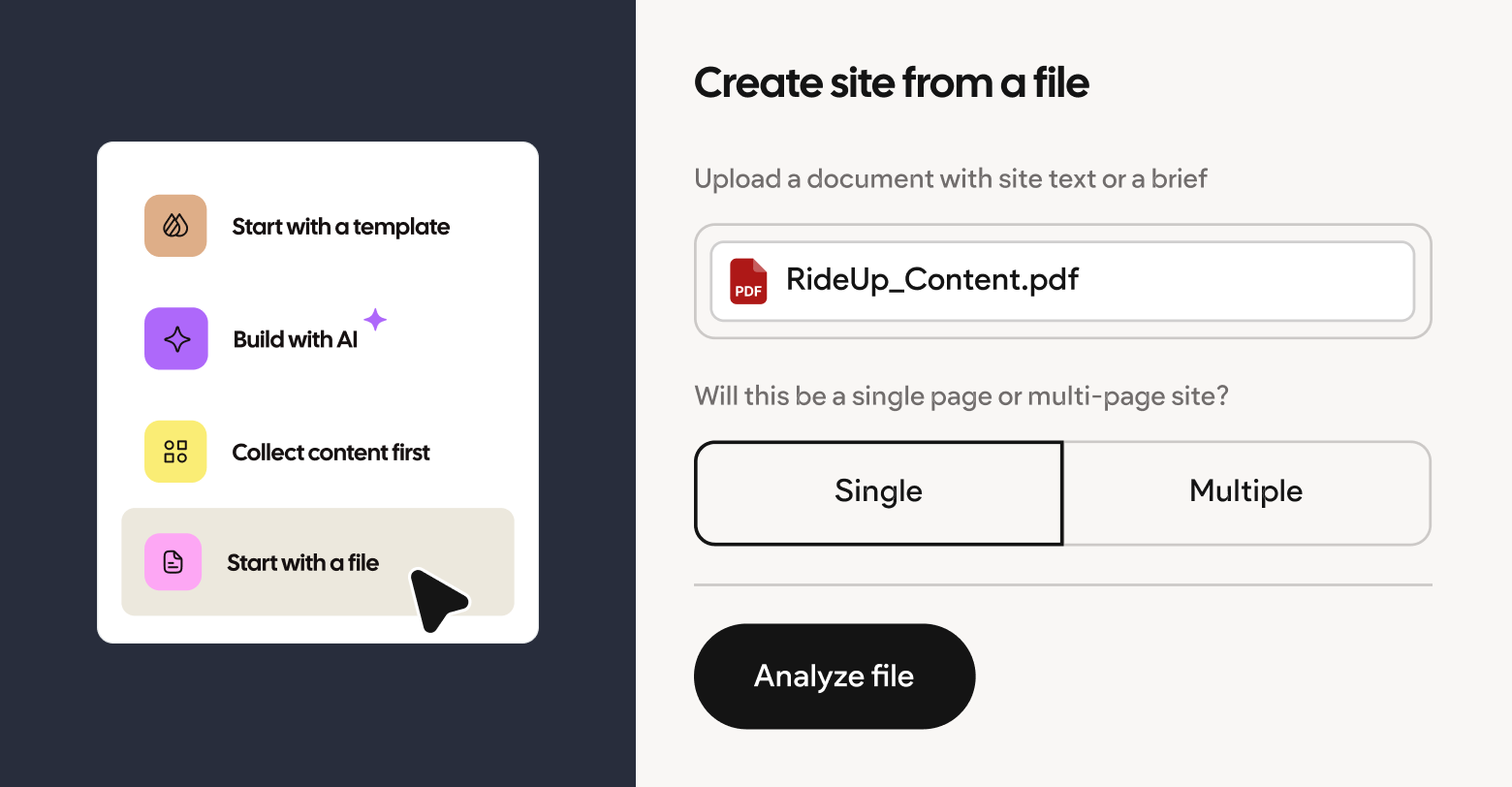
Duda’s upcoming File-to-Site feature supports both of these flows, helping agencies save time by eliminating repetitive copy-and-paste tasks and centralizing their process into one unified space. Designers can generate sites based on the exact copy contained within the doc, or use AI to translate a client brief into a stunning, hyper-relevant website in seconds.
If you choose to use the verbatim content from your file, you can easily drag-and-drop that text into the editor; streamlining the design process while maintaining complete control over the design. No matter which option you choose to process your file, the AI Assistant is always available to automate your workflow.
Flexibility
Today’s small business websites are no longer just digital business cards. They’re central hubs for how these businesses operate online, serving as storefronts, booking engines, and lead generators—all simultaneously. Whether it’s capturing appointments, showcasing products, or collecting inquiries, the modern website needs to work hard behind the scenes to keep business flowing.
That’s why, for SMBs, websites are no longer just about having a presence, they’re about creating outcomes. A website should drive real ROI, converting visitors into customers and supporting business goals like revenue growth and retention. For agencies, that means building sites that don’t just look good, but deliver measurable results their clients can see and value.
We’re excited to share with you a few upcoming features that’ll make that task a little easier.
Creating custom widgets in Duda just got easier with the help of AI. Duda's new
AI-powered Widget Builder can dramatically speed up development, turning a design or idea into fully functional widget code using Duda’s JavaScript API, even if you already know how to code. Our AI Assistant understands Duda's developer documentation and is able to generate reusable, scalable widgets that are simple for your, or your clients, to use. Whether you’re building a list with complex button actions or integrating external services like weather or stock data, AI helps you get there faster and with fewer errors.
You can start with a visual design and quickly bring it to life as a functional widget tailored to your needs, or simply describe the widget of your dreams to the AI Assistant using your own natural language until that dream becomes reality.
Duda's Native Booking
Duda’s new Native Booking tool makes it simple for small businesses to accept and manage appointments directly from their websites. With an intuitive, proven user experience, built as a natural extension of the Duda platform, it’s easy for clients to handle bookings on their own. The tool integrates seamlessly with site themes for a polished, responsive design, and supports workflows and templates to help agencies create booking-enabled sites at scale with minimal manual effort.
The booking widget includes robust features like unlimited event types, paid appointments, automatic or manual confirmations, and support for multiple team members. It also integrates with calendars and sends reminders via email, helping businesses stay organized and reduce no-shows. Designed to grow with your clients’ needs, it brings advanced booking capabilities into one flexible, native solution.
Arriving later this year, Duda’s new native multi-step form builder gives you the power to create highly customized forms that match your client’s exact needs. With support for multi-step flows, conditional logic, and advanced structure options, you can guide users through a personalized experience that improves both engagement and data quality.
Designed for flexibility, the form builder offers full control over layout, styling, and functionality—including support for payments and bookings. It’s also AI-ready, enabling future use cases like AI-generated form templates or submissions triggered from AI search engines.
Discoverability
The way people discover businesses online is changing, and it’s changing fast. Search isn’t limited to Google anymore. Consumers are increasingly turning to platforms like ChatGPT, Google’s AI Mode, and other conversational tools to do their research, resulting in a fragmentation of traditional traffic sources. While Google still dominates, driving nearly 373X more traffic to Duda-powered websites than ChatGPT last year, we continue to see traffic from chatbots grow almost exponentially.
This shift in discovery behavior matters. People are learning about products and services offsite, often before they ever reach a business’s website. This doesn’t mean the website is less important, rather, it means it needs to be ready to convert when visitors arrive. As intent becomes more refined by the time a visitor hits the site, the opportunity to convert is higher. Agencies and SMBs alike need to think beyond the traditional funnel. Discovery may happen elsewhere, but that makes the engagement and conversion experience on the site even more critical to get right.
That’s why we’ve invested in features to prepare your clients for today’s new discovery landscape, where more research is occurring offsite, as well as the discovery landscape of tomorrow, where AI drives more and more traffic to the open web.
LLMs.txt
The number of people turning towards AI tools to discover new businesses, products, and services is growing every day. Moreso, AI-referred traffic
has been shown to convert at higher rates than traditional search traffic, often
as much as 9X. We want to make it easier for you to attract this high value traffic.
Every time you publish a site on Duda, we now automatically generate an
llms.txt file—no extra work required. This file acts like a cheat sheet for AI tools like ChatGPT and Claude, helping them understand and represent your site’s content more accurately. It’s similar to robots.txt for search engines, but built specifically for large language models.
By including clean, structured data like live URLs and meta descriptions (but skipping drafts and no-index pages), llms.txt improves how your clients’ businesses appear in AI search results. Most sites still don’t have this, giving your sites a head start in the AI-powered web. It’s a small upgrade with big potential for better visibility and more accurate representation.
CloudCampaign
CloudCampaign is now in the Duda app store, giving agencies a powerful way to manage social media across multiple clients. With tools for scheduling, AI-powered caption writing, client approvals, and reporting—all in one dashboard—it simplifies day-to-day workflows and saves valuable time, whether you're managing one brand or many.
A strong social media presence is paramount for building brand consistency, while also improving visibility across AI platforms like ChatGPT, helping drive more offsite discovery and traffic. With features like white-labeling, unlimited users, and deep analytics, CloudCampaign makes it easy to grow your clients' reach and results.
Putting it all together
We're not just adapting to the future of the web; we're actively building it, putting powerful, intuitive tools directly into the hands of agencies like yours. From leveraging AI for unprecedented productivity to transforming websites into dynamic conversion hubs and mastering the new landscape of online discovery, Duda is committed to empowering you to thrive. The transformation we see today is an invitation to lead, to innovate, and to redefine what's possible for your clients. Join us as we continue to shape a web where agencies don't just keep pace, but truly set the pace.