If you’re on a SaaS product or revenue team, “let’s build our own website builder” is one of those ideas that sounds great in a strategy deck and awful in a sprint plan. Owning the website layer promises new revenue and stickier customers, but it also means designing and maintaining visual editors, hosting, SEO and AI visibility, accessibility, security, and support long before you see any ROI.
A single production-grade website builder integration can easily take
6-24 months of engineering time, most of it on unglamorous plumbing your customers expect to “just work.”
You don’t have to make that bet. Instead of a big-bang “build a builder” project, you can take a crawl-walk-run path with an embedded, white-label platform like Duda: launch a minimal viable website offering with a small subset of customers, deepen integrations once you see attach and revenue, and let a specialist own performance, compliance, security, and maintenance.
Let’s break down that phased journey (with real-world examples) to learn how SaaS businesses can add customizable client websites as a real product line without extensive and expensive investments.
What is the crawl-walk-run approach?
In product development,
crawl-walk-run is a way to de-risk major investments. You start with a lean MVP to gather feedback, then layer on integrations and automation once the value is proven, and only in the final phase do you invest heavily and scale promotion.
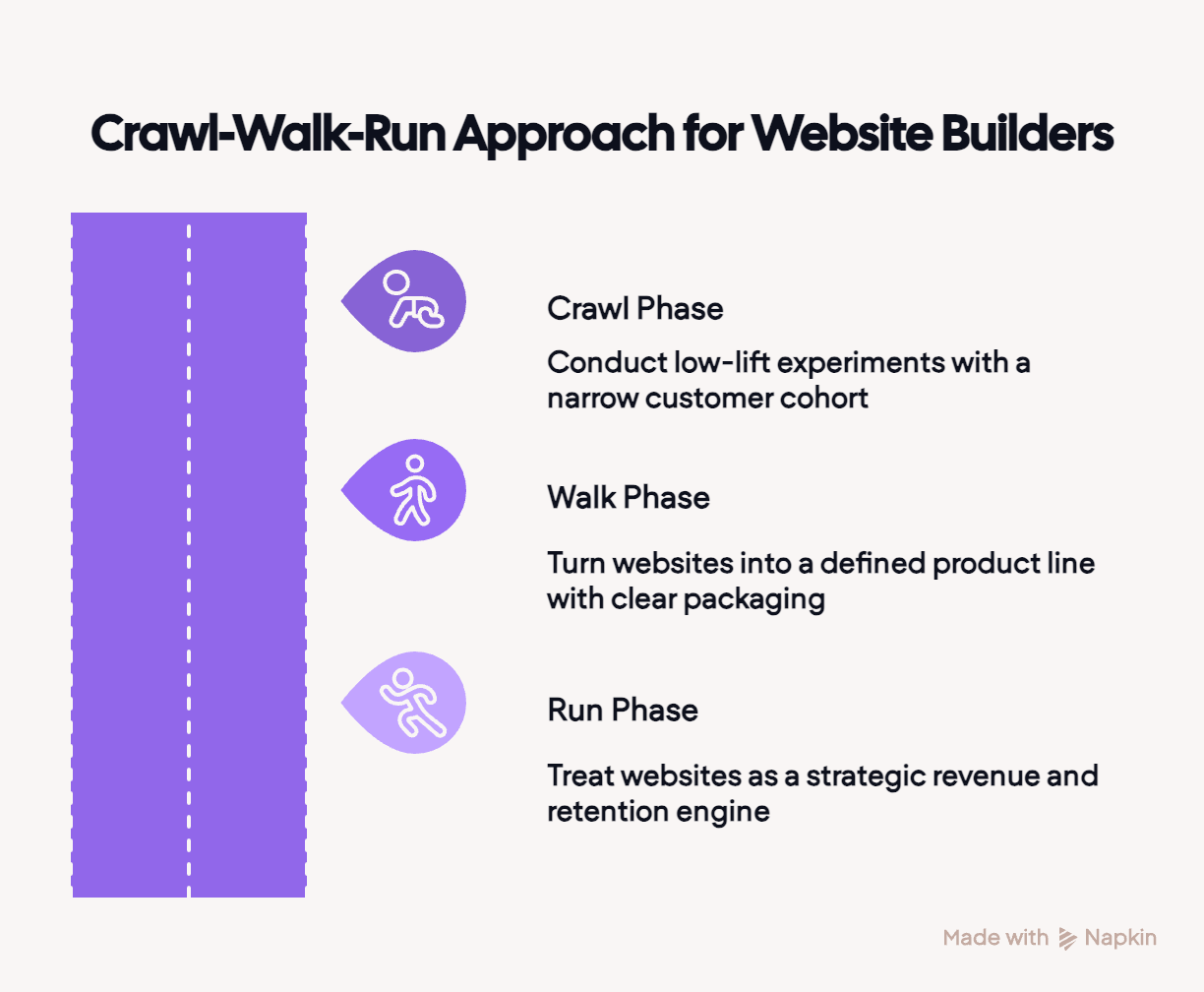
For embedded website builders in SaaS, that translates to:
- Crawl: Offer a quick-to-market implementation to a narrow cohort or customers to see if bundled, managed websites move ARPU and early retention using no-code tools and white-label flows wherever possible.
- Walk: Turn “websites” into a defined product line with clear packaging, pricing, and plan eligibility, and start using APIs and SSO to tie the website experience tightly into your product.
- Run: Treat the website layer as a strategic revenue and retention engine, powered by advanced features like custom code, webhooks, complex automations, and data-driven workflows across a governed fleet of sites.
Crawl: Testing the revenue story
In the crawl phase, you’re not “rolling out a website builder” to your entire customer base. You’re running a contained experiment with a small, clearly defined cohort to answer one question: does a bundled website offer actually move revenue and stickiness?
The goal at Crawl is to learn whether websites deserve a place in your value proposition and sales motion. Your core product stays in the lead, and websites play a supporting role with the tightest possible scope:
- Narrow audience: Choose one vertical, region, or customer segment where websites are obviously valuable and where you already know the workflows. You’re optimizing for fast learning, not a perfect cross-section of your base.
- Tightly scoped offer: Start with one or two clear packages (e.g., “Starter site with integrated booking” or “Single-location business site”) instead of promising every possible integration or layout.
- Low-code plumbing: Use no-code and low-code tools (like Zapier or n8n) to handle triggers and data syncs (rather than burning engineering time on custom integrations just to test demand).
What to measure at Crawl
The Crawl experiment should quickly tell you whether websites are worth more investment. Focus on a small set of learnings from this pilot group:
- Attach rate: Of the customers you offer sites to, how many say yes?
- ARPU uplift: How much extra revenue do you see from accounts with a site versus similar accounts without one?
- Early retention signals: Do accounts with sites log in more, adopt more features, or churn less?
- Organic demand: Do other customers start asking for “that website thing” they’ve seen in your marketing or heard about from peers?
Crawling with Duda
On Duda, Crawl rarely requires writing a line of code. You use Duda’s white-label website builder to deliver and manage sites for your pilot cohort, while your product team validates whether this should become a permanent line on the roadmap.
A typical Crawl-stage setup with Duda includes:
- One vertical, unified experience: Pick a single ICP and build a template that bakes in your core workflow (bookings, listings, jobs, etc.). Travel SaaS platform
Bókun did exactly this: they combined their booking widget with Duda templates to give tour operators a turnkey “site + booking” package instead of sending them off to struggle with generic CMSs.
- A branded flow: Even at crawl, you don’t want users to feel they’ve wandered out of your app. With Duda’s white-label editor and SSO, you can link straight from your dashboard into a co-branded builder where everything matches your product. That’s how SaaS players like
Broadly turned “we’ll help you get a site” into a seamless, guided experience rather than a support nightmare.
- Guardrails and measurement first: Your team controls templates, design systems, and core settings, while you track key adoption and revenue metrics by segment. That gives you a clean read on whether accounts with a site behave meaningfully differently from similar accounts without one.
Walk: Refining a defined product line
At the Walk stage, websites stop being an experiment. They become a real product line in your SaaS with a defined SKU, clear packaging, revenue targets, and a repeatable delivery process. The question shifts from “can this work?” to “is this scalable and profitable?”
A walk-stage integration typically includes:
- Productized packaging and pricing: Websites become a clear line item in your offering. You decide which plans include a site and how websites show up in sales decks and pricing pages.
- Deeper integration with your product: “Website” is now a persistent area in your app, not a one-time flow. Customers can discover, create, edit, and manage their site from within your app instead of jumping out to a separate tool. Core objects from your product flow into site templates so the website feels like a front-end for a system, not a disconnected brochure.
- Stronger identity, permissions and guardrails: Authentication, roles, and access controls are defined and enforced. There’s an owner for templates and content models, a process for rolling out changes, and basic observability around site creation, changes, updates, and failures.
What to measure at Walk
Here you’re validating whether websites can stand as a scalable, profitable line of business.
- Attach rate by plan: Of accounts eligible for a site, how many actually create one, and how does that compare to Crawl?
- Activation and time-to-value: How long it takes a new customer to go from signup to a live site, and what percentage start or publish a site during onboarding.
- Website-driven revenue: Incremental MRR/ARR from website-inclusive plans and add-ons, plus how often websites pull customers into higher tiers, ad packages, or DFY services.
- Account retention and product health: Differences in churn, engagement, and feature adoption between accounts with active sites and similar accounts without.
- Operational efficiency: Average time spent per site (builds, recurring edits, reporting) and the volume of support tickets or manual interventions related to websites.
Walking with Duda
On Duda, the Walk phase is where “websites as a feature” harden into a commercial product line. Crawl has already proven demand with a narrow cohort; now you standardize plans, flows, pricing, and operations so websites reliably drive revenue and retention.
Integration at the Walk stage with Duda typically features:
- Commercialized website plans: Websites show up as a named SKU in your pricing and packaging, often bundled into specific tiers or sold as DFY builds. Property management platform
DoorLoop added Duda-backed websites as a formal part of their offering, launched hundreds of customer sites in under two years, and saw customers with a published site send about twice as many rental applications while cutting churn dramatically.
- Embedded, in-app website area: “Website” becomes a persistent section in your app navigation and user flows. Event-management platform
doo wired its event dashboard straight into a custom-branded Duda builder via SSO, so users can spin up and manage event sites without leaving the app
- Data-connected templates at scale: Core objects (properties, events, services, locations) feed directly into Duda templates, so sites behave like a front-end for your system of record. DoorLoop’s property data flows into standardized layouts while doo’s event data flows into event pages.
The next step is Run, where you treat the website layer as a strategic, automated revenue and retention engine.
Run: Websites as a strategic revenue & retention pillar
At Run, websites are fully embedded in your SaaS. The web layer is wired into your data and workflows, and you manage the entire fleet of sites as a lever for revenue, NRR, and product usage.
Your typical Run-stage setup includes:
- Fleet-level scale and governance: Hundreds or thousands of sites share centrally managed templates, design rules, and content models, so brand, legal, and accessibility updates are rolled out once and applied everywhere.
- Extensive automation and webhooks: Site creation, updates, and retirement are triggered by lifecycle events in your product (new account, new location, status changes), orchestrated via APIs and webhooks rather than one-off scripts.
- Product workflows on the web layer: Booking, applications, payments, and portal logins run through the site using custom code and integrations, turning websites into a living front end to your platform.
What to measure at Run
Here, you’re tuning a mature engine rather than proving the concept:
- Fleet coverage and health: Percentage of eligible accounts with an active site and how many sites are current on templates, brand, and compliance.
- Website-driven revenue and NRR: MRR/ARR tied to websites and related services, plus NRR uplift for accounts with sites versus those without.
- Engagement and growth: Volume and growth of core actions (bookings, applications, orders, logins) and conversion rates coming through your sites.
- Automation and operating cost: Share of sites provisioned and updated automatically and the volume of manual tickets per 100 sites.
Running with Duda
With Duda, Run is where websites operate as a governed, automated growth engine under your brand:
- Fleet-level governance at scale: You update templates, components, and accessibility tooling once and propagate the change across thousands of client sites.
AppFolio, for example, consolidated a large portfolio of property management sites on Duda and used marketplace tools to roll out accessibility improvements across the board in a single coordinated motion.
- Automated provisioning and updates: New accounts, locations, or offerings trigger sites or new pages automatically, filled with data from your platform. A
leading hospitality provider uses Duda’s APIs and templates to spin up conversion-focused hotel sites much faster than before, while turning the website fleet itself into a recurring MRR line.
- Websites as a primary growth engine: Sites become a standard part of your go-to-market. With private transportation platform
Moovs, embedded Duda-backed sites fit into its core offer so operators get a modern, conversion-ready site plus booking in one place, contributing to clear gains in ARR, customer growth, and qualified traffic flowing through those websites into its core product.
A safer way to add a real revenue line
Client websites are a growth opportunity for SaaS-based businesses, but they don’t have to be large up-front investments. If you treat them as a crawl-walk-run journey, you can validate the revenue story, turn it into a clean product line, and only then scale into a governed fleet that delivers measurable business outcomes. Duda’s role in that journey is to give you one platform you can use at every stage: light-touch pilots in Crawl, embedded and data-connected experiences in Walk, and fleet-level governance and automation in Run.
If you’re ready to map what Crawl, Walk, Run could look like for your own platform,
talk to us about embedding Duda as your website layer.