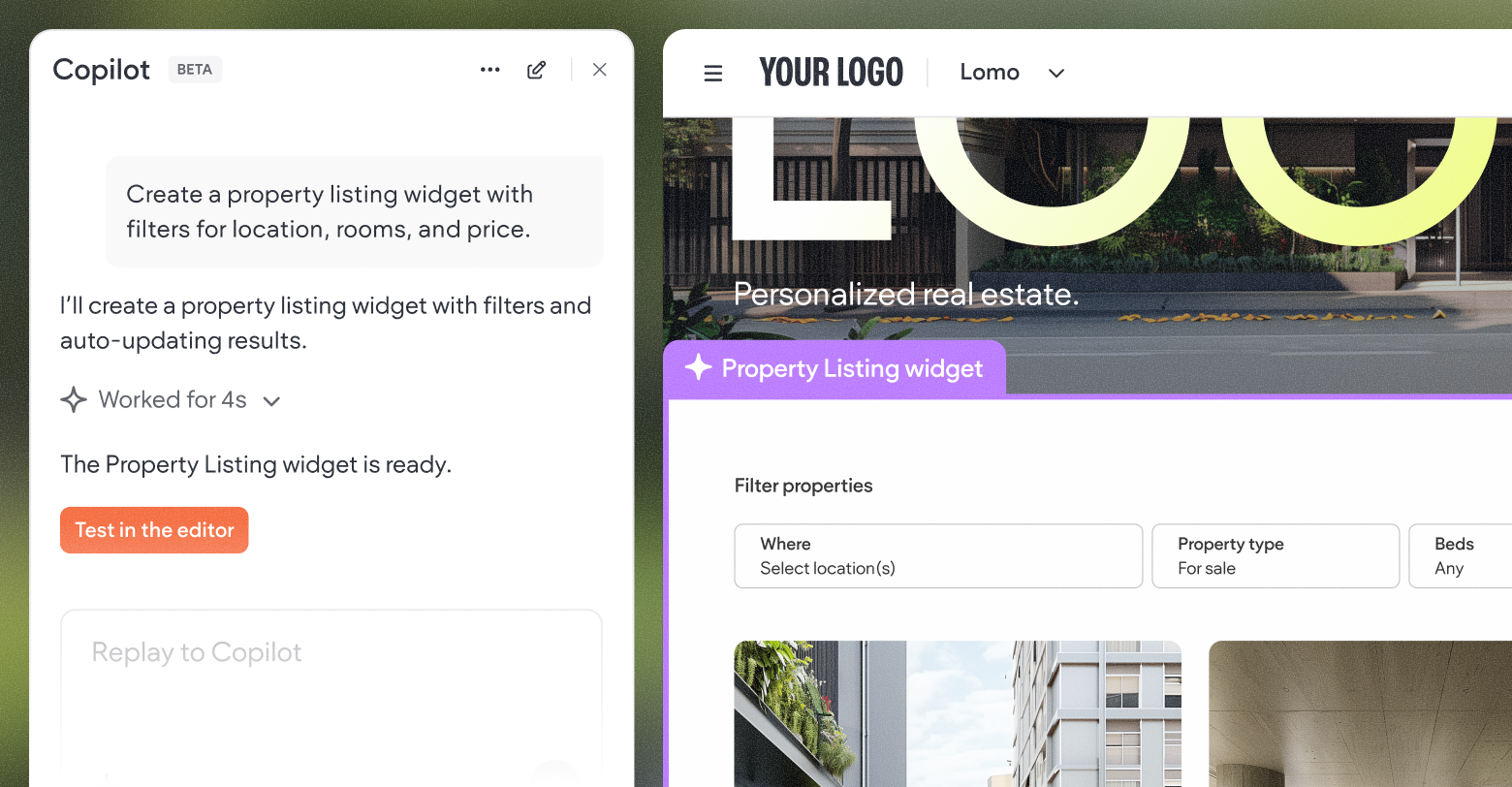
Imagine if creating custom widgets for Duda websites was as easy as simply typing your idea into an empty text field. How would that change the way you deliver websites to clients and the value you provide? Just think of it; if this were possible, you could quickly address practically every niche request your clients could ever come up with.
Well, dream no longer.
Duda’s new AI-powered widget builder enables you to use conversational AI to generate new custom website widgets entirely inside the Duda platform. No need for third-party solutions, environments, or complex coding. This new tool makes it possible for anyone to create useful widgets in mere minutes!
Let’s now take a look at the overall advantages of Duda’s custom widget builder, how the introduction of AI makes it even more powerful, and some examples of the types of widgets you can now create for clients using this revolutionary feature.
What is the Duda custom widget builder?
At its core, Duda’s widget builder is a feature that allows web professionals to create fully custom, reusable widgets using industry-standard web technologies like HTML, CSS, and JavaScript, directly inside the Duda editor. Custom widgets created by agencies and freelancers behave and feel like Duda’s built-in widgets, but incorporate any functionality your client needs. Third-party tools, unique design elements, or entirely new interactive capabilities tailored to specific use cases can be added to websites quickly and easily.
These widgets are more than just code snippets: they are reusable assets. Once created and published, they can be deployed across multiple client sites, dramatically reducing repetitive work and improving consistency for agency workflows.
How AI supercharges widget creation
Traditionally, building a custom widget—even with Duda’s built-in tools—required at least some basic coding and development skills. Site owners and web pros needed at least a moderate understanding of how HTML is structured, how CSS styles elements, how JavaScript interacts with the DOM, and how to test and debug for responsive behavior, etc.
However, with the release of our new AI-powered widget builder, knowledge of those specific skills are no longer required.
Below is a breakdown of how the process now works, thanks to this monumental change.
1. Conversational UI for widget specs
Instead of starting from a blank code editor, you describe what you want in plain language. For example:
- “Create a countdown timer showing days, hours, minutes, and seconds until a launch date.”
- “Build an interactive pricing calculator that updates as users change inputs.”
- “Make a carousel of customer testimonials with fade animations.”
The AI assistant takes this description and generates an execution plan and working code for you.
This conversational interface lowers the barrier to entry dramatically. Non-coders can now participate meaningfully in widget creation and developers can save hours or even days of grunt work.
2. Immediate preview & iteration
Once Duda’s AI has created a widget, you can immediately preview it within the editor. If something needs tweaking—layout, colors, interactions—you can ask Duda to adjust it through another natural language prompt. Want to change a font, add responsiveness on mobile, or include animation? Just say so.
3. No local setup required
You don’t need a local development environment. There’s no setup of Node.js, Git, or deployment pipelines. Everything happens inside the Duda editor, streamlining your workflow.
4. Fewer bottlenecks & faster deployment
For agencies, this means fewer bottlenecks. Junior designers can prototype widgets; project managers can experiment with concepts without waiting for developers; and senior engineers can focus on the hard stuff instead of getting bogged down with basic coding.
Who can access the AI widget builder?
Initially, the Widget Builder feature was exclusive to Duda’s Custom plan. With the introduction of the AI Assistant, Agency and White Label plan holders now get access too.
With the lower tier plans, you can publish up to 3 AI-powered widgets, and add them to up to 10 sites. If you need unlimited widget building capacity (along with API access, etc.), upgrading to the Custom plan unlocks those capabilities.
This tiered access model makes it easier for agencies of different sizes to start experimenting with the widget builder and delivering more value to customers.
Why agencies should care
The AI Widget Builder isn’t just a curiosity or time-saving gimmick; it’s a strategic advantage for agencies for several reasons:
1. Speed to delivery
Widgets that previously may have taken hours or days to code can now exist in minutes. When deadlines loom and clients ask for last-minute additions to their sites, your team no longer has to scramble to create best-in-class solutions.
2. Consistency across projects
Reusable, client-specific widgets mean you don’t need to reinvent the wheel for every project. You can build a library of widgets—interactive calculators, dynamic galleries, custom forms, or whatever else you like—and reuse them across multiple client websites.
This boosts consistency, quality and performance across your entire portfolio of sites.
3. Lower cost of entry
Not every agency has a full team of developers. Smaller teams, especially designers or solopreneurs, can now build advanced functionality without a single line of code. This levels the playing field with large agencies and makes you much more competitive in a (often) challenging marketplace.
4. Client satisfaction
Anyone who has ever worked with SMB clients knows that they frequently want custom features that set their websites apart. With Duda’s AI widget builder, you can deliver bespoke functionality quickly, delighting clients and increasing retention.
Example widgets you can build today
Below are some practical examples of the types of widgets that can be quickly and easily created with this new tool.
1. Bespoke countdown timer
A common request among small business clients across a wide variety of industry verticals is some sort of custom countdown timer. Perfect for product launches, event pages, or special sales campaigns, a countdown widget with animated digits, color controls, and optional sound cues provides urgency, builds anticipation and boosts conversions.
Example prompt:
“Create a countdown timer widget that shows days, hours, minutes, and seconds. The countdown should animate the digits and allow colors to be customized in the settings panel.”
2. Dynamic pricing calculator
A pricing calculator can help customers understand potential costs instantly. For service businesses or eCommerce stores, this widget could calculate quotes based on user inputs and display results in real time.
Example prompt:
“Make a pricing calculator that lets users choose service options and updates the total cost instantly. Include drop-downs for options and visual steps as users go through selections.”
3. Custom bar chart or graph
Clients love when they can use data visualization to highlight performance metrics or product benefits. Unlike static images, a chart widget that updates with dataset inputs adds professionalism.
Example prompt:
“Create a custom bar chart widget where agency team members can input labels and values. It should be mobile responsive and animated on load.”
4. Infinite scrolling gallery
Great for portfolios or product collections, an infinite scrolling image gallery keeps users engaged without overwhelming them with content.
Example prompt:
“Build an infinite scrolling image carousel with autoplay and smooth transitions. Include dot navigation and pause on hover.”
5. Interactive FAQ or accordion widget
Every pixel worth of space is precious on an SMB website. A collapsible FAQ format enhances UX while saving aforementioned space.
Example prompt:
“Make a collapsible FAQ widget with search functionality and smooth animation when sections open.”
6. Custom contact form with conditional logic
Lead generation forms are one of the most common and mission-critical types of SMB website widgets. With Duda’s AI-powered widget builder you can help clients generate leads with logic-driven forms that show fields only when certain criteria are met.
Example prompt:
“Create a contact form widget with conditional fields and show a phone number field only if the user says they want a call back.”
Best practices for building widgets with AI
To get the most out of the AI Widget Builder there are few key things to remember. These include the following.
Be explicit & detailed
AI works best when prompts are crystal clear. Include specifics like:
- What UI elements you need
- Interactive behaviors
- Mobile responsiveness
- Animation preferences
Iterate & tweak
Use the built-in widget preview feature and tweak options. Ask the AI assistant to adjust colors, layout, or logic until it’s exactly right for your client’s business.
Test on multiple devices
Although the AI does a great job, always test your widget on different screen sizes. Even small tweaks can make a big difference in UX.
Conclusion
Duda’s new AI-powered Widget Builder is a powerful leap forward in website building. It takes one of the most technical parts of site customization and makes it intuitive and conversational. Agencies can now convert ideas directly into functional solutions without sacrificing quality, speed, or creativity.
Whether you’re a seasoned developer, an emerging designer, or a solopreneur, this tool unlocks new possibilities for client work. From dynamic interactive features to bespoke design elements, the only limit is your imagination.